
Running a VR Lab Without Being a Tech Expert: A Teacher's Guide

Short answer: No, a teacher does not need to be good with technology to run a VR lab. The teacher taps one button to start the lesson, an AI helper guides the students, and the teacher watches the whole class on one screen. These are things a teacher already does every day.
Let's be honest about the real worry. When a school hears "VR lab," the first thought is often: "My teachers are already busy. A room full of headsets sounds hard. We tried new tech before and it just sat in a cupboard."
It's a fair worry. So this guide answers it plainly. No sales talk — just what a teacher actually does to run a VR class, why it doesn't need any tech skill, and what training to expect. If you're a school leader thinking about a VR lab, or a teacher who's just been handed one, this is for you.
(Quick note: this guide is about teachers running a VR lab for students. It is not about using VR to train teachers — that's a different topic.)
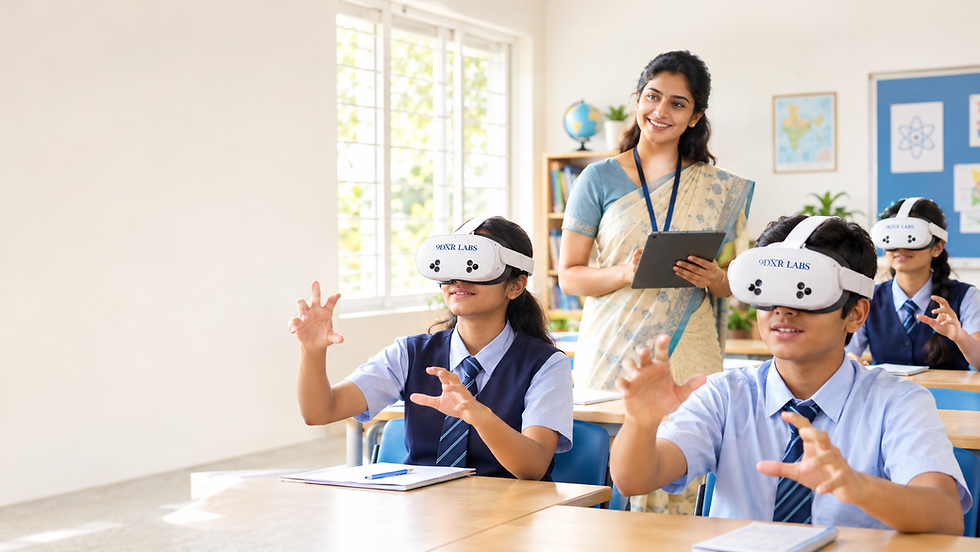
Do teachers need to be good with technology to run a VR lab?
No. A good school VR lab is made so that any teacher can run it, even if they are not a tech person. The teacher does not set up the headsets, write any code, or fix anything. They pick a lesson, start it with one tap, and keep an eye on the class — just like any other period.
The hard parts are done for the teacher. The lessons are ready and already matched to the syllabus. The headsets come set up. An AI helper does the step-by-step guiding. So the teacher can focus on teaching, not on machines.
What does a teacher actually do in a VR class?
Not much — and none of it is technical. A teacher running a 9DXR Labs VR class does four simple things:
Pick the lesson. On a laptop or tablet, the teacher taps the topic for that class — say, a Class 8 science chapter.
Start it with one tap. One tap sends that lesson to every headset at once. No setting up each headset one by one.
Let the AI helper guide students. Inside the headset, an AI helper called Medha explains each step to the student. So the teacher doesn't have to repeat the same instruction 40 times.
Watch the class on one screen. The screen shows who has finished, who is stuck, and each student's score. The teacher helps where it's needed.
That's the whole job. If you can play a video on the class screen and walk around the room, you can run a VR class.
How does the teacher stay in control of the class?
The teacher stays in control through one simple screen — the teacher dashboard — on a laptop or tablet. It turns a room full of headsets into one class the teacher can see and manage from a single place.
From that screen, a teacher can:
Start the same lesson on every headset with one tap
See who has finished and who is still working, live
See each student's score by topic, worked out for them
Show one student's view on the class board, so everyone can watch and talk about it together
And because these headsets work with your hands — no remote controls — there is nothing to hand out, connect, or collect. Students just use their hands. That removes a whole layer of fiddly setup that slows teachers down with other systems.
📖 Read more: Hand Tracking vs Controllers in a School VR Lab — why a no-remote lab is much easier to run
How much training do teachers need for a VR lab?
Very little. Teachers get short, hands-on training at the school when the lab is set up, so staff feel ready before they run a class on their own. Good training is simple and practical — how to start a lesson, use the screen, and show a view on the class board. It is not a technical course.
Here's what teacher training for a VR lab should cover:
A quick, hands-on tour of the teacher screen
How to start, pause, and change a lesson
How to show a student's view on the class board
How to charge and store the headsets
Who to call if you need help later
The goal is simple: by the end, a teacher who has never touched VR can run a full class with confidence. And help is always a call away, so no teacher is left on their own.
What if something goes wrong in the middle of class?
Most hiccups are small and easy — a headset needs charging, or a student can't find a button. Because the AI helper guides each student, the teacher isn't the only helper in the room. That takes a lot of pressure off.
For anything bigger, the school has someone to call, and all the headsets are managed from the one screen, not one by one. The teacher is never expected to be a repair person. If a headset stops working, you simply set it aside and students share — which is already how it works when a class has more students than headsets.
"We tried new tech before and it gathered dust." Why is this different?
This is the honest fear behind every VR question, so it's worth answering. Tech gathers dust when only one "tech person" in the school knows how to use it. The day they're busy or absent, it stays in the cupboard.
A VR lab is different only if any teacher can start it in seconds. That's the whole point of the one-tap screen, the AI helper, and the hands-only headsets — they're built so a normal teacher uses the lab every week, not once a term. A lab that's easy to run is a lab that actually gets used.
The real reason this matters
The teacher decides whether a VR lab gets used or forgotten. A lab only a tech person can run gets opened once a term. A lab any teacher can start in seconds gets used every week — and that's the only way a school really gets its money's worth.
So the question for a school isn't "are my teachers good enough with tech?" It's "is this VR lab easy enough for any teacher to run?" With hands-only headsets, a one-tap screen, an AI helper, and simple training, the answer is yes.
Want to see how easy it is for a teacher to run? The best next step is to look at how the hands-only system works.
Frequently asked questions
Do teachers need training to use a VR lab?
Teachers get short, hands-on training at the school when the lab is set up. It covers how to start a lesson, use the screen, and show a view on the class board. No tech or coding background is needed. Most teachers can run a class after one session.
Is VR hard for teachers to use?
No. A good school VR lab is made to be simple. The teacher taps one button to start the lesson, an AI helper guides the students, and the teacher watches the class on one screen. If you can play a video in class, you can run a VR lesson.
How does one teacher manage a whole class in VR?
Through one screen on a laptop or tablet. The teacher starts the same lesson on every headset with one tap, sees who has finished, checks each student's score, and can show any headset's view on the class board.
Does the teacher have to set up each headset?
No. These headsets use no remote controls to connect, and the teacher starts lessons on all headsets at once from the screen. There's no one-by-one setup.
Read more from 9DXR Labs
Hand Tracking vs Controllers in a School VR Lab — why no-remote is easier for teachers
Immersive Learning in Indian Schools — what students actually do in VR, subject by subject
How a VR Lab Fits Inside an Atal Tinkering Lab — VR in a makerspace
AR VR Lab for Schools in India: Space, Equipment and Setup — setting up the room


Comments